
403 Permission Error Fix
| | | |

Tech Tips: 403 Forbidden Error Fix: .htaccess file creation

If you are starting a new account you may need to create an .htaccess file in order to view your website:

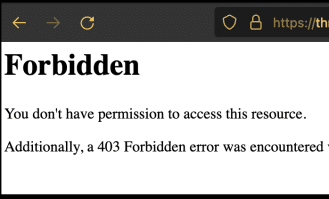
403 forbidden Error will show up instead of your home page unless you have an .htaccess:

403 Error Fix

To fix go to “File Explorer” In Cpanel (or FTP) then enter the “public_html” folder and create(+File) or Edit the file: Name it: .htaccess

Add the content below to the .htaccess file starting with “# Begin WordPress” & ending with “# END WordPress

# BEGIN WordPress

RewriteEngine On
RewriteRule .* - [E=HTTP_AUTHORIZATION:%{HTTP:Authorization}]
RewriteBase /
RewriteRule ^index\.php$ - [L]
RewriteCond %{REQUEST_FILENAME} !-f
RewriteCond %{REQUEST_FILENAME} !-d
RewriteRule . /index.php [L]

# END WordPress


Please see the official WordPress htaccess page for more options

Please let us know if you need any assistance.

Similar Posts

  • |

    Software Utilities

    Site Software List of website software installed by Cpanel Notifications of software updates available Blogs WordPress PHP/MySQL Blog System Optimize Website Optimize the performance of your website by tweaking the way Apache handles requests. Info: This setting changes mod_deflate usage by Apache only. Use the MultiPHP INI Editor interface to manage Zlib compression on PHP…

  • |

    Database Utilities

    Manage large amounts of information over the web easily. MySQL databases are necessary to run many web-based applications, such as bulletin boards, content management systems, and online shopping carts. For more information, read the documentation. phpMyAdmin Direct Access to Database with Import/Export, Edit and more… MySql databases Create and Modify Databases and Users MySQL Database…

  • |

    Metrics Utilities

    Visitors This function displays up to 1,000 of the most recent entries in the Apache log for a given domain’s web site. Errors The function displays up to 300 of the most recent entries in your website’s error logs, in reverse chronological order. You can use this information to find broken links or problems with…

  • |

    File Management

    File Manager File Access through the Browser. Upload, Download, Compress and Extract directly from the Cpanel Images Modify and manage images that are saved to your account. For more information, read our documentation. Thumbnailer Create thumbnails from images in a directory. Scaler Change the size of images in a directory. Converter Change the file type…

  • | | | |

    What is Zen Web Media?

    Zen Web Media was created in 2014 in San Diego, California to serve the needs of high-end Business Website Development & Hosting. Website Development: Website development involves designing, coding, and testing a website to ensure it meets the website owner’s or client’s requirements. It includes creating the layout, writing the code, adding content, and testing…